WhatsApp Business API in Kazakhstan.
An official channel, a shared team inbox and an AI agent — with no risk of bans.
CareHub connects the WhatsApp Business API (WABA) through official Meta access: business verification, message templates, broadcasts and unlimited agents on one number. Every conversation lands in one inbox next to Instagram, Telegram and website chat, with an AI agent on the front line.
- Official access via Meta
- Contract and invoices in tenge
- Servers in Almaty
- Support in Russian and Kazakh
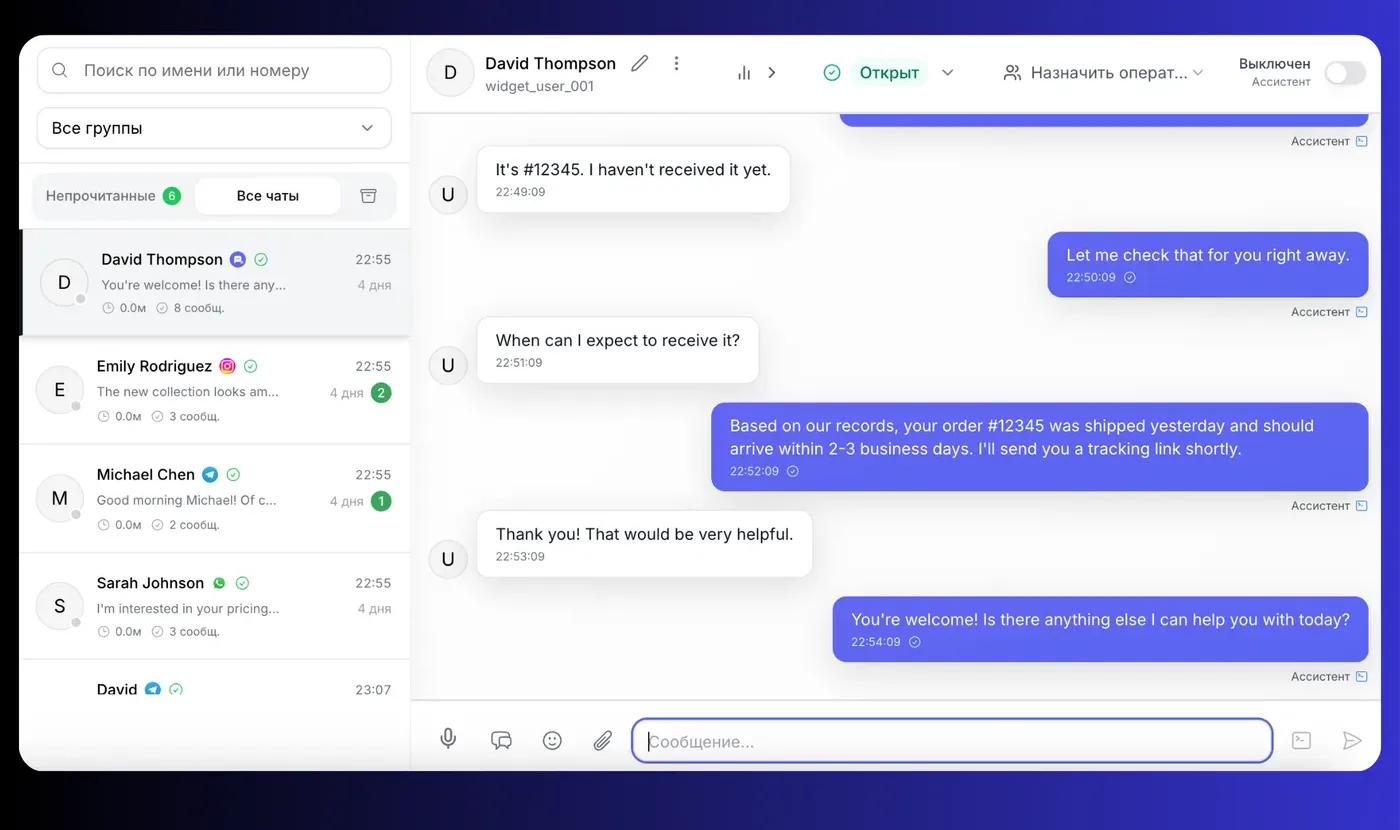
Meta-approved WABA templates in one CareHub customer account
conversations a month through one inbox at Magnum Alliance
channels on one platform: WhatsApp, Instagram, Telegram, website
of routine requests closed by the AI agent without a manager
Numbers from the public Magnum Alliance case study — B2B distribution, Almaty. Read the case study →
What the WhatsApp Business API is and how it differs from the app
A business has three ways to work in WhatsApp. The first two are phone apps; the third is Meta's official API, which lives on servers and plugs into a platform like CareHub. The difference is fundamental.
| Capability | Personal WhatsApp | WhatsApp Business App | WhatsApp Business API |
|---|---|---|---|
| Who replies to customers | One person from one phone | One number, up to 4 linked devices | Unlimited agents and an AI agent on one number |
| Broadcasts | Risk of number ban | Broadcast lists up to 256 contacts, ban risk | Meta-approved templates, limits grow with quality |
| Business verification | No | No | Verified Meta business account with your company name |
| Automation and AI | No | Auto-reply and greeting | AI agent, flows, buttons and lists, webhooks, API |
| CRM and analytics | No | No | Bitrix24, delivery and read statuses, per-agent reports |
| Where history lives | On an employee's phone | On an employee's phone | On the company's server — history stays when a manager leaves |
| Cost | Free | Free | Platform subscription + messages at Meta rates |
While one person handles customer chats, the app is enough. The moment you have a second manager, broadcasts or a need for automation, you need the WhatsApp Business API.
What the WhatsApp Business API gives you through CareHub
Not a bare API but a ready workspace for the team: onboarding, templates, broadcasts, an AI agent and analytics in one subscription — no developer and no paid add-ons.
Meta-approved templates
Create a template in CareHub, submit it to Meta review and track its status. Variables, buttons, attachments — no manual work in Business Manager.
- Marketing
- Utility
- Buttons and variables
Buttons, lists, catalog
Interactive WhatsApp messages: quick replies, list pickers and catalog links — the customer taps instead of typing.
- Quick replies
- Lists
- Catalog links
No-code automations
Visual builder: a “new chat” trigger, IF/ELSE conditions, a “Send WhatsApp template” block, delays and HTTP requests to external systems.
- Send template
- IF/ELSE
- HTTP request
Bitrix24, API and webhooks
Two-way Bitrix24 integration out of the box. For everything else — API and webhooks on Growth and above.
- Deals and contacts
- Webhooks
- Developer API
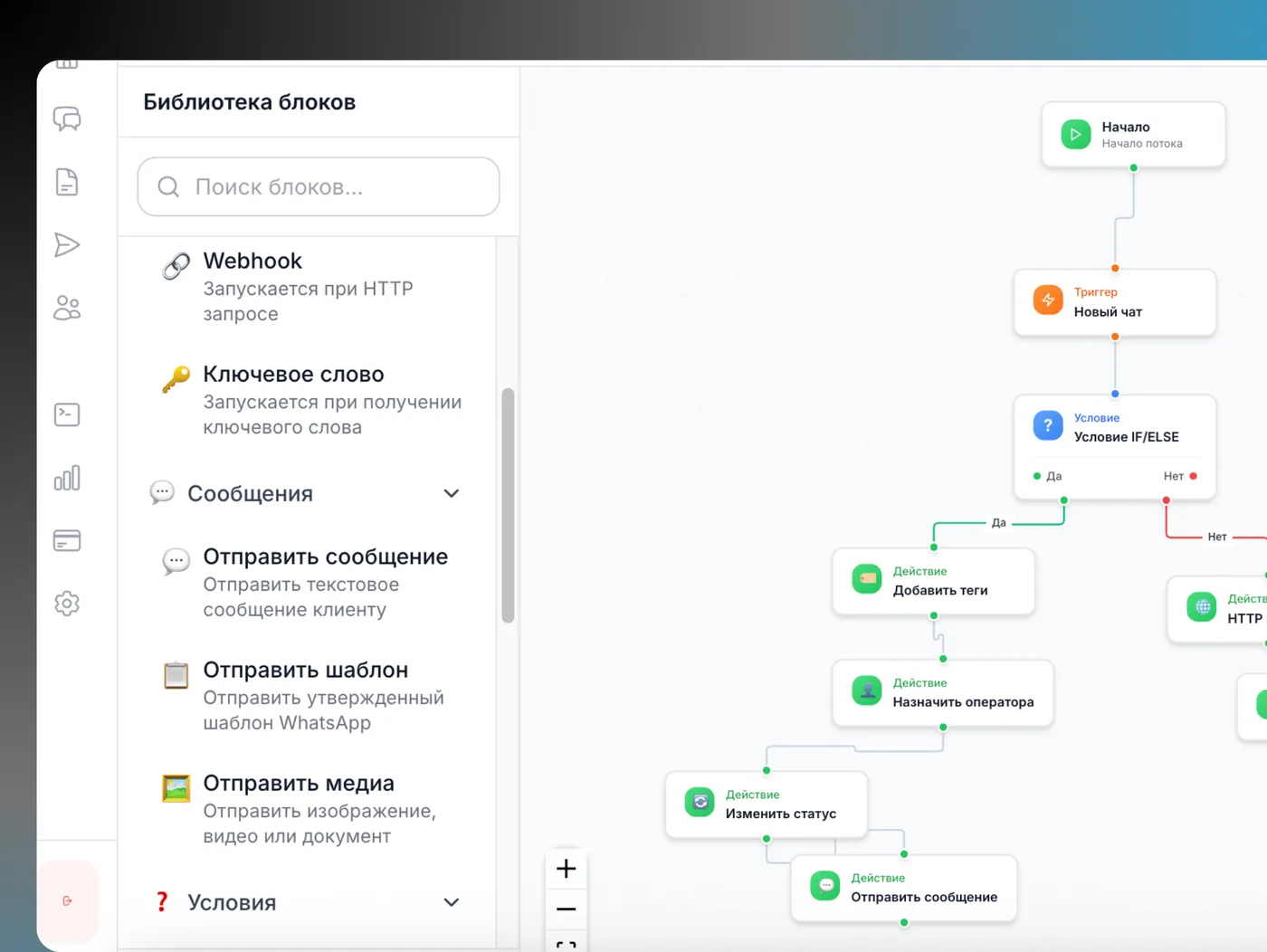
WhatsApp templates — right inside your flows
The automation builder has a “Send template” block: a Meta-approved template goes out on a trigger — a new order, an appointment booking, an unanswered question after 30 minutes.
Triggers from your process
New chat, keyword, webhook from your CRM or website, schedule. The template goes out at the right moment, not “when the manager remembers”.
Utility templates instead of calls
Order confirmation, delivery status, appointment reminder — service messages customers expect and reply to.
The reply lands in the inbox
As soon as the customer replies to a template, the 24-hour window opens: the AI agent or an operator picks up the conversation in the same chat.
How to connect the WhatsApp Business API in Kazakhstan: 5 steps
Onboarding happens inside CareHub through Meta's official signup. A CareHub manager guides verification and the first templates — no developer needed.
- 01
Step 1. Phone number
10 minutesAny number that can receive an SMS or a call works: mobile, landline or virtual. If it already runs regular WhatsApp, the account must be unlinked first — chat history does not transfer to the API.
- 02
Step 2. Meta business portfolio and verification
1–5 business daysWe create a portfolio in Meta Business Manager and submit your company documents: registration certificate and website or page confirmation. Before verification the number is capped at 250 conversations a day; afterwards limits grow automatically.
- 03
Step 3. Connect in CareHub
15 minutesIn channel settings, Meta's signup window opens: log in to Facebook, pick the portfolio, confirm the number with a code. The number appears in the inbox right after confirmation.
- 04
Step 4. Message templates
up to 48 hours for reviewWe prepare the first templates: greeting, order confirmation, reminder. Submitted to Meta review from CareHub — usually approved within minutes, up to two days in complex cases.
- 05
Step 5. Team, AI agent, launch
1 dayInvite operators, upload your price list and policies to the knowledge base, test the AI agent in the sandbox chat and switch it on for the channel. The first week is calibration on real conversations.
Total: 2 to 7 business days — the timeline is set by Meta verification, not by the technical part.
Meta rules you need to know before launch
The WhatsApp Business API is not “WhatsApp without limits”. Meta has clear rules on who can send what and when. CareHub enforces them automatically, but they are worth understanding.
The 24-hour customer service window
When a customer messages you, a 24-hour window opens: inside it you can reply with free text, voice notes and files. Once the window closes, or when you message first, only a Meta-approved template can be sent.
Four message categories
- ServiceFree until 1 October 2026Reply to a customer inside the 24-hour window
- Utility$0.035 per messageOrder status, booking confirmation, invoice
- Marketing$0.055 per messagePromotion, new arrival, abandoned cart
- Authentication$0.035 per messageOne-time verification code
Meta rates for Kazakhstan until 1 October 2026, passed through by CareHub with no markup. From 1 October 2026 Meta introduces charges for service messages and a separate rate card for Kazakhstan — exact rates are not yet published. What changes on 1 October 2026 →
Business-initiated conversation limits
How many unique customers you can message first in 24 hours. The limit grows automatically as the number sends more messages with a good quality rating.
- 250 before verification
- 1,000
- 10,000
- 100,000
- Unlimited
Number quality rating
Meta rates the number by customer blocks and reports: green, yellow, red. When the rating drops, limits shrink and marketing templates can be paused. Segmentation, opt-in and useful utility messages keep the rating green.
What the WhatsApp Business API costs in CareHub
One subscription — the platform, inbox, AI agent, broadcasts and a WABA number. Meta messages are billed separately at Meta's rates with no CareHub markup. All prices in tenge excluding VAT, contract with a Kazakhstan LLP.
Growth
- 1 WABA number included
- Number setup — free
- Extra number — 12 000 ₸/month
- 10 agents, 1 000 active contacts
- 15 000 outbound messages a month
- AI agent with a knowledge base
- WABA broadcasts and automations
- API, webhooks, Bitrix24
Advanced
- 2 WABA numbers included
- Number setup included
- Extra number — 18 000 ₸/month
- 10 agents, 1 000 active contacts
- Unlimited outbound messages
- Advanced analytics
- Priority support
- Everything in Growth
Meta messages at cost
Marketing $0.055, utility and authentication $0.035 per message, service free inside the 24-hour window (rates until 1 October 2026). Charged to the organisation balance in tenge at the day's rate.
The 14-day trial without a card gives you the inbox, the AI agent and WhatsApp on a regular number via QR. The WABA number itself, broadcasts and automations start with the Growth plan.
All plans and calculatorWABA + AI agent: the template opens the conversation, the agent runs it
A typical chain in CareHub: a utility template goes out on a trigger, the customer replies, the 24-hour window opens — and the AI agent closes the question itself or hands it to a manager with context.
Transparent AI under Kazakhstan law
You define how the agent introduces itself and see every action in the chat feed — which makes compliance with the Law on Artificial Intelligence, in force since 18 January 2026, straightforward.
Boundaries instead of hallucinations
In the instructions you set what the agent asserts, what it clarifies and when it calls a human. Behaviour is checked in a test chat before customers see it.
Per-channel toggles
The agent can run the WhatsApp Business API while Instagram stays with operators — or the other way round. In any chat a manager switches the agent off with one toggle.
Who needs the WhatsApp Business API in Kazakhstan
If customers write to you on WhatsApp and more than one person replies, you are already the target audience. Here is how different industries use WABA.
Online stores and marketplace sellers
Order confirmation, delivery status, abandoned-cart recovery. The AI agent answers about stock and timing; a manager joins at payment.
“Your order #{{1}} is with the courier, delivery {{2}}”
Clinics, dental practices, salons
Appointment reminder a day ahead, booking confirmation, test results on request. Fewer no-shows, less idle time for doctors.
“Reminder: appointment on {{1}} at {{2}} with Dr {{3}}”
Car dealers and service centres
Leads from the website and Instagram flow into WhatsApp, AI qualifies by model and budget, the manager gets a hot lead with context.
“{{1}}, your car is ready. Work order total: {{2}} ₸”
Schools, courses, education centres
Answers about programmes and prices 24/7, payment and schedule reminders, broadcasts by group.
“Group {{1}} class is moved to {{2}}”
Real estate and developers
First-line qualification by budget and district, property shortlists, viewing reminders. One number — the whole sales team.
“Viewing of {{1}} confirmed for {{2}}. Address: {{3}}”
B2B distribution and wholesale
Like Magnum Alliance: 244 templates for price lists, stock and shipment statuses, 731 conversations a month through one inbox.
“Updated price list for {{1}} attached. Stock as of {{2}}”
CareHub, a BSP directly or an SMS aggregator: what to choose
Three types of providers connect the WhatsApp Business API in Kazakhstan. Technically the channel is the same for all — the difference is what you get on top of API access.
| Capability | CareHub | BSP directly | SMS aggregator |
|---|---|---|---|
| Inbox for a team of agents | Yes, in the subscription | No, you need your own system | Usually no |
| AI agent with a knowledge base | Yes, from Starter | No | No |
| Templates and broadcasts from the UI | Yes, with review from CareHub | Via API or Business Manager | Yes, as SMS-style campaigns |
| Instagram, Telegram, website chat alongside | Yes, one inbox | No | No |
| Help with Meta verification | Manager-guided | Documentation | Depends on the vendor |
| Prices and contract | Tenge, Kazakhstan LLP | USD, terms of service | Tenge |
| Developer required | No | Yes | For integrations |
| Launch | 2–7 business days | Weeks, with development | Days, without an inbox |
A detailed breakdown of provider types and the questions to ask before signing is in our article on WABA providers in Kazakhstan. Open the provider breakdown
Why connecting WABA through CareHub is safe
Official access, a Kazakhstan legal entity and data stored in Kazakhstan.
Official Meta Business Partner
The WhatsApp Business API is connected through official signup in Meta Business Manager — no grey numbers and no resold accounts.
CareHub LLP, Astana Hub resident
Contract, invoices and closing documents in tenge. For your accounting — an ordinary Kazakhstan vendor.
Servers in Almaty
Conversations and contacts are stored in Kazakhstan, not in a data centre overseas — easier for internal policies and audits.
WhatsApp Business API FAQ
It is Meta's official way to connect WhatsApp to a business system rather than a phone. The number lives on Meta's servers (Cloud API), and conversations run through a platform like CareHub: several agents, an AI agent, message templates, broadcasts and CRM integrations. Unlike the WhatsApp Business app, the API is built for teams and high conversation volumes.
Go deeper
Connect the WhatsApp Business API with the CareHub team
Leave your number — a manager will message you on WhatsApp, check your readiness for Meta verification and help launch the first templates.
No card for the trial. WABA onboarding is available on Growth and above.